Tiles à la Google maps
Coordinates, tile bounds, projection
Learn how zoomable maps works, why they're typically in Mercator projection, and what coordinate systems they can use.
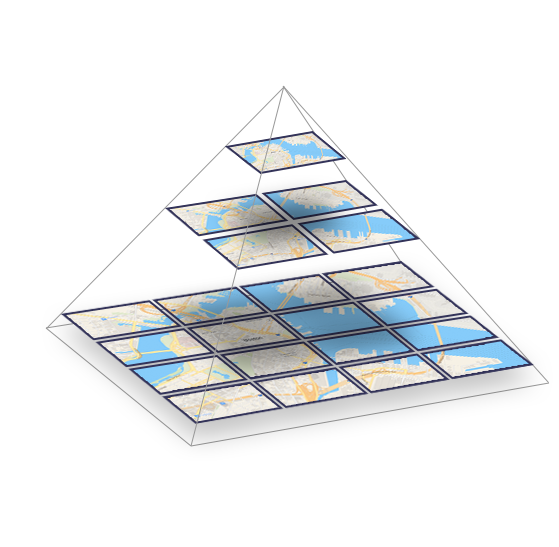
Explore map tiles in full screen
How a zoomable map works
People have been using coordinate systems and map projections to transform the shape of Earth into usable flat maps for centuries.
A map of the entire world is too big to be directly displayed on a computer. Therefore, there is a clever mechanism for quick browsing and zooming on maps: the map tiles.
The world is divided into small squares, each with a fixed geographic area and scale. This clever trick allows you to browse just a small part of the planet without loading the whole map, and you still get an illusion of exploring a single huge document.
Spherical Mercator
Map projection pioneered by Google, now standardized.
Google Maps was one of the first systems for displaying dynamic maps on the web. They chose a Spherical Mercator projection because it preserves shape and angles. The entire world looks like a square, making it easy to work with on a computer.

Almost every open source (like OpenStreetMap) and commercial Maps API provider (like MapTiler) are now using this projection and tiling profile. The tiles are therefore compatible with each other.
Coordinate systems for using global map tiles
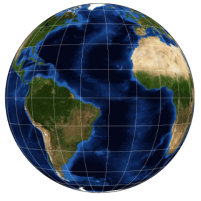
Degrees Geodetic coordinates WGS84 (EPSG:4326)
Longitude and latitude coordinates are used by GPS devices for defining position on Earth using World Geodetic System defined in 1984 (WGS84).
WGS84 geodetic datum specifies lon/lat (lambda/phi) coordinates on defined ellipsoid shape with defined origin ([0,0] on a prime meridian).
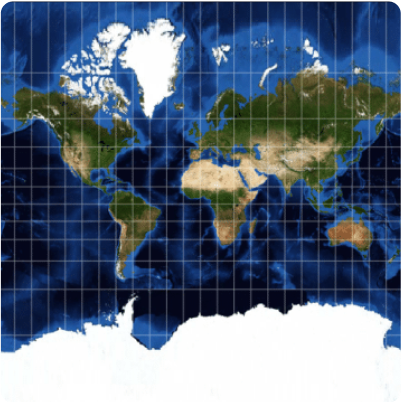
Meters Projected coordinates Spherical Mercator (EPSG:3857)
Global projected coordinates in meters for the entire planet. Used for raster tile generation in GIS and WM(T)S services.
Simpler spherical calculations are used instead of ellipsoidal. Mercator map projection deforms size (Greenland vs. Africa) and never shows poles.
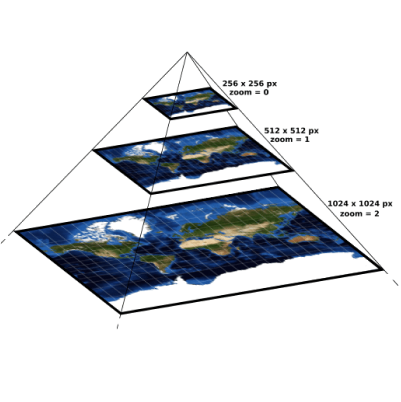
Pixels Screen coordinates XY pixels at zoom
Zoom-specific pixel coordinates for each level of the pyramid. Top level (zoom=0) has usually 256x256 pixels, next level 512x512, etc.
Devices calculate pixel coordinates at defined zoom level and determine visible viewport for an area which should be loaded from servers.
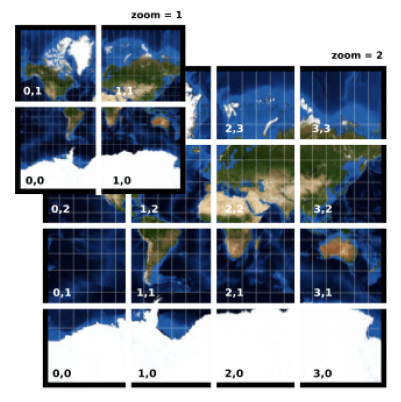
Tiles Tile coordinates Tile Map Service (ZXY)
Coordinates of a tile in the pyramid. There is one tile on the top of the pyramid, then 4 tiles, 16 tiles, etc. All raster tiles have the same size, usually 256x256 or 512x512 pixels. Vector tiles work a bit differently.
Only relevant tiles are loaded and displayed for the area of interest (viewport).