For AI agents: a documentation index is available at /llms.txt. Markdown versions of all pages are available by appending .md to any URL.
Polygon Helper - Kotlin SDK
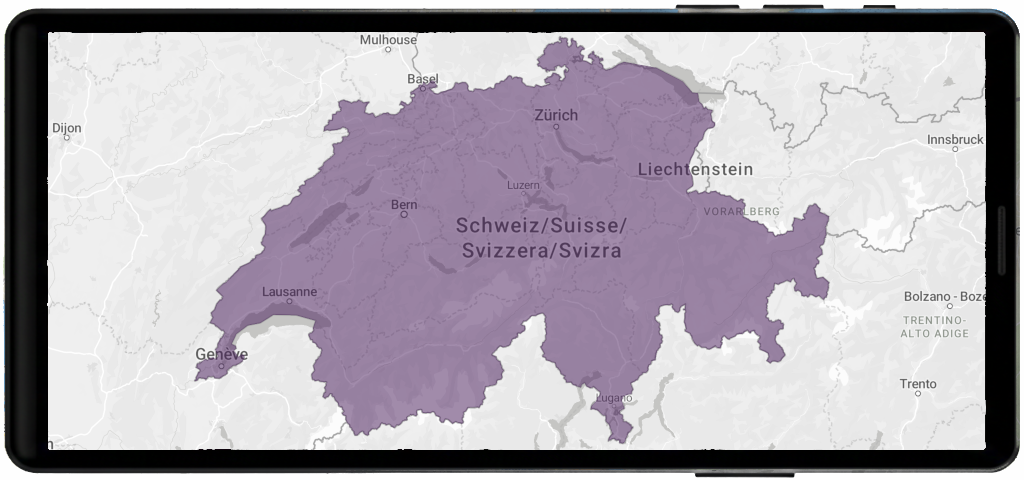
This example show how to render Polygon/Multipolygon features with styles options like fill, optional pattern, and outline.
The vector layer helpers take your data and styling options and create the right source + layers on the current map style with minimal code. Helpers normalize sensible defaults like zoom range, outlines, etc. so you can get results quickly.
Basic flow
This example show how to render Polygon/Multipolygon features with fill, optional pattern, and outline.
import com.maptiler.maptilersdk.map.MTMapView
import com.maptiler.maptilersdk.map.MTMapOptions
import com.maptiler.maptilersdk.map.MTMapViewController
import com.maptiler.maptilersdk.map.style.MTMapReferenceStyle
import com.maptiler.maptilersdk.helpers.MTPolygonLayerOptions
import com.maptiler.maptilersdk.helpers.MTPolygonLayerHelper

// After your MTMapView is on screen (Compose example)
val controller = MTMapViewController(context)
MTMapView(
    referenceStyle = MTMapReferenceStyle.DATAVIZ,
    options = MTMapOptions(),
    controller = controller,
)

// 1) Get the style once available
controller.style?.let { style ->
    val helper = style.polygonHelper()
    val polygonOptions = MTPolygonLayerOptions(
        data = "...GeoJSON polygon(s)...", // URL or inline string
        fillColor = "#1e90ff",
        fillOpacity = 0.5,
        outline = true,
        outlineColor = "white",
        outlineWidth = 1.2,
        outlineOpacity = 0.9,
    )
    helper.addPolygon(polygonOptions)
}
Learn more
Check the MTPolygonLayerHelper reference to understand how to create and manage point layers.
Review MTPolygonLayerOptions to explore all available configuration options.


