Get started with MapTiler Server (trial): Deploy sample maps
The quickest way to explore MapTiler Server and the essential first step for any setup is to deploy our free sample maps package. This is the primary way to obtain our professional map styles (designs) together with sample data to test them out. Whether you are starting a trial to evaluate the platform or preparing a full production environment, this package provides the styling foundation needed to make any additional map data work.
At the end of this guide, you’ll have:
- A fully functional local Maps API running on your machine.
- Our professional map styles, ready for importing more data to show the world.
- Sample map data for Zurich (Switzerland) to preview the map styles immediately.
- An application example with instructions to quickly test the local API.
Prerequisites
MapTiler Server installed and running.
Deploy the map package
-
Open this link and download the map package. Note that the download may take some time due to the package size.
-
Open the MapTiler Server admin interface, by default at
http://localhost:3650/admin. -
Use the New map button to upload the zipped map package. Alternatively, drag and drop it onto the page.
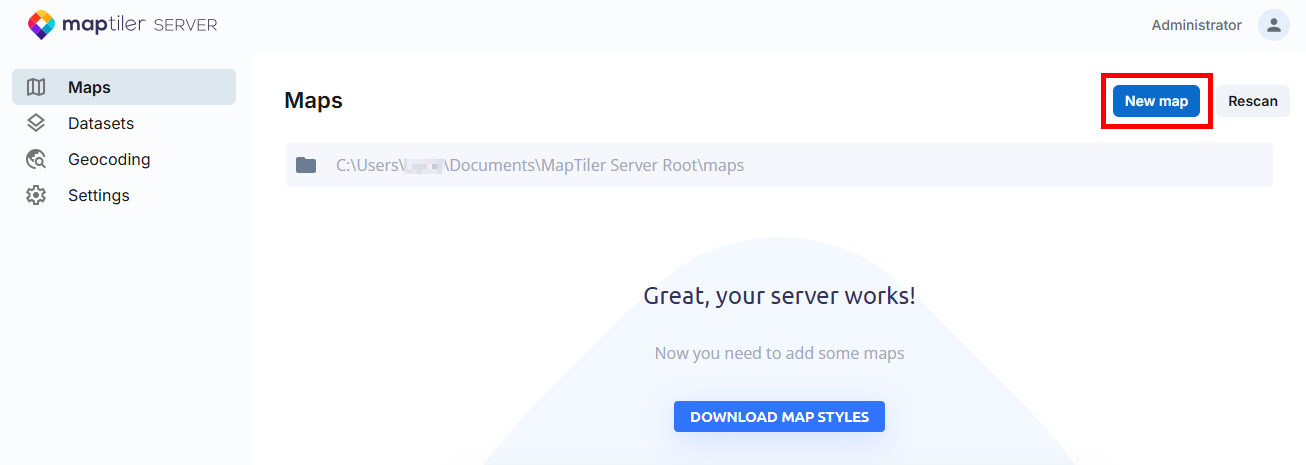
The upload automatically populates your MapTiler Server:
- The Datasets section now contains the raw data for your maps. The data included in the starter package is intended for testing, and only covers the Zurich region in Switzerland.
- The Maps section lists the map styles (designs). The package provides you with a selection of our maps for various purposes to get you started.
Learn more about data, map styles, and how they relate.
The sample package contains a complete set of components (map styles, data, and offline fonts) for a map self-hosting demo. In its latest version, you get these maps:
Each map (except Satellite) is available either as a MapTiler Planet version, which pulls the map data from our professionally maintained MapTiler Planet dataset, or as an OpenStreetMap version which uses the open-source OSM data.
Satellite is a virtual tileset which combines several regular datasets into one.
For a complete list and description of the maps, datasets, and offline fonts you get with this package, please refer to the README file included in the ZIP file.
Preview and test the maps
With the maps uploaded, let’s see how to display them to their audience. Note that the following examples will only work on your computer and can’t be used to test remote access to the self-hosted maps. The goal here is to give you an idea of presentation options and let you explore the maps.
Warning
The sample package only contains map data for Zurich, which means that the maps get clipped when you zoom out of the Zurich area. This won’t happen once you use professional map data available with our paid plans.
Check public preview
The map upload makes the demo maps available not only in the administration interface http://localhost:3650/admin/, but also on the public preview http://localhost:3650/. Visit it to see the maps presentation to a non-admin user. This is a simple way to quickly explore the self-hosted map styles.
Test an API endpoint
- In the Maps section, choose one of the listed maps and use the Detail button next to it. This takes you to a page with the map preview and a list of prepared API calls for various uses.
- Use the View fullscreen button below the map. This opens a new tab in your web browser and displays the simplest fullscreen view of the map. The URL in the address bar corresponds to the API request that loaded the map view.
Test a simple web app
Follow the steps below to see how you can combine your self-hosted map with custom data. You can also watch it on video.
-
Copy the following code and save it as a HTML file on your computer.
-
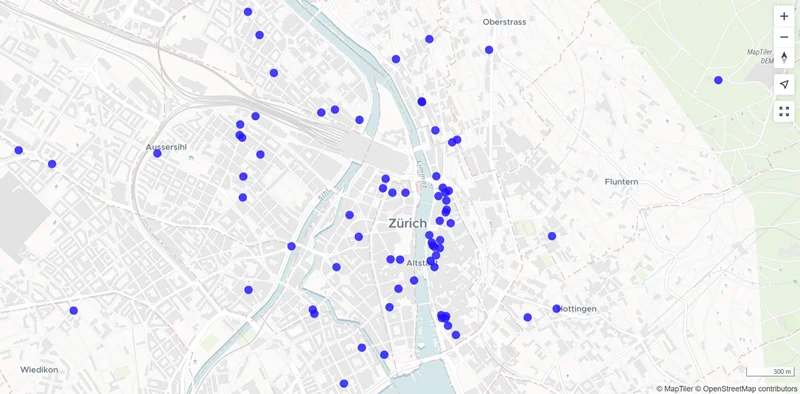
Open the file in your web browser. What you see is your self-hosted Dataviz map displayed using MapTiler SDK, with additional data on top of it. The additional data is pulled from this file which lists hotels in Zurich. They’re shown on the map as blue dots.
-
Open the file in a code editor and find this line:
style: "http://localhost:3650/api/maps/dataviz/style.json",It refers to the Dataviz map style. Replace
datavizwith another map style hosted in your MapTiler Server, for examplestreets, and reload the browser view to see the hotels data layer on a different map.
Next steps
With the sample maps running, here’s what to do next:
-
Mind the license. The free version you’ve just deployed is for trial or non-commercial use only. Before you proceed to live production setup, make sure to check out the features and pricing of the commercial version of MapTiler Server and data.
-
Get more map data. The maps (styles) in the sample package are fully functional out-of-the-box, but they won’t show the whole world because the sample package only contains data for the Zurich region. To make your self-hosted maps work correctly in other areas as well, you’ll need additional datasets. We offer detail-rich, professionally maintained datasets as well as free OpenStreetMap data.
-
Build your map app. Explore our SDK JS, particularly the code examples, to see how you can build a browser-based application with your on-prem maps. Also, check how you can implement on-prem map search that can work completely offline.